- Order Confirmation Messages Impact Customer Trust and Satisfaction :
- What is an Order Confirmation Message?
- Types of Order Confirmation Messages :
- Why Does WhatsApp Work Better for Real-Time Order Updates ?
- Best-Practice Checklist :
- The Role of WhatsApp Order Confirmation in a Better Post-Purchase Experience :
- Ready-to-Use WhatsApp Templates :
- Using Chatbots for Order Confirmations :
- Make it Effortless With Botbuz (WhatsApp + E-Commerce) :
Order Confirmation Messages Impact Customer Trust and Satisfaction :
When a person buys something online, the way a business talks to them afterward is just as important as the sale itself. Sending a clear order confirmation acts like a digital “thumbs up,” letting the customer know their money was received safely and their package is on the way. This builds a lot of trust because it removes the worry of being scammed or forgotten.
While many companies send these updates through email so the customer has a permanent receipt, using apps like WhatsApp is becoming popular because it feels more like a quick, friendly chat and allows the customer to get instant updates right on their phone. Applying these simple steps helps a business turn a stranger into a happy, returning customer.
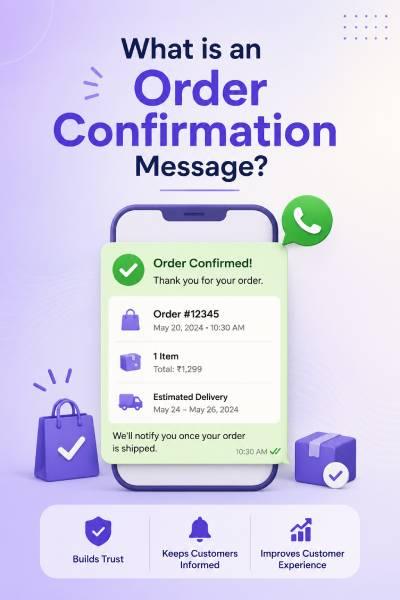
What is an Order Confirmation Message?
An order confirmation is basically a digital “thank you” note that a store sends the moment someone finishes buying something. Its main job is to show the customer a summary of what they bought and prove that the store actually received their order, which helps the buyer feel safe and relaxed.
These messages usually pop up as an email for safekeeping or as a quick text on WhatsApp or SMS so the person sees it right away. In the big picture of shopping, this message is the bridge that moves the customer from the “paying” stage to the “waiting” stage, proving the business is organized and ready to get to work.
Why do Timely Order Confirmations and Shipping Updates Matter?
Sending updates quickly after someone buys something is like giving them a constant status report so they never have to guess what is happening. It stops the “buyer’s butterflies” by showing that the company is real and that the package is actually moving toward their front door.
Because the business sends these details automatically, it saves everyone time since customers don’t have to call or email to ask, “Where is my stuff?” Overall, being honest and fast with these messages makes a brand look professional and reliable, turning a stressful waiting period into an exciting countdown for the customer.
What are the Key Elements of an Order Confirmation Email?
An effective order confirmation is like a high-quality “fact sheet” for a purchase. It includes the order number and a list of what was bought so the customer knows exactly what they are paying for, plus it confirms that their payment went through and their address is correct.
It also acts as a roadmap by giving an estimated arrival date and a tracking link so they can follow their package’s journey. Finally, by using the customer’s name and giving them an easy way to ask questions, the message makes the store feel friendly and helpful rather than just a cold, automated machine.
Types of Order Confirmation Messages :
|
Type
|
What it Includes
|
Best Used For...
|
|---|---|---|
|
Basic
|
Order number, items, and total cost.
|
General retail and simple sales.
|
|
Cross-Sell
|
Customer name + "You might also like..."
|
Boosting future sales and loyalty.
|
|
Tracking
|
A live link to the delivery map.
|
High-value items and eager shoppers.
|
|
Gift
|
Custom notes; prices are hidden.
|
Birthdays, holidays, and surprises.
|
|
Subscription
|
Monthly costs and renewal dates.
|
Streaming services or snack boxes.
|
|
Booking
|
QR codes, dates, and locations.
|
Events, movies, or appointments.
|
|
Pre-Order
|
"Coming Soon" dates and instructions.
|
New tech or book releases.
|
Why Does WhatsApp Work Better for Real-Time Order Updates ?
WhatsApp is often the best choice for sending updates because it reaches people exactly where they spend most of their time. Unlike emails that might get lost in a cluttered inbox, a WhatsApp message pops up right on a person’s phone screen, making it much more likely to be seen and read immediately.
It also allows the customer to actually talk back to the store or click easy buttons to track a package, which feels more like a fast, friendly conversation than a boring formal letter. By using this app, a business makes it super simple for someone to stay informed without ever having to go searching for information.
Best-Practice Checklist :
To ensure a professional and reliable post-purchase experience, businesses should follow a specific set of rules when communicating with their customers. A great order confirmation needs to be sent the very second a purchase is finished so the buyer doesn’t have to wait or worry. The message should be kept short and easy to read, using the customer’s name to make it feel more personal rather than a robotic form letter.
It is also important to include helpful details, like a tracking link or a “help” button, and to make sure the text looks perfect on a phone screen. Finally, the message should use the same friendly style and colors as the rest of the brand, making the whole shopping journey feel like one smooth, connected experience.
What are the Best Practices for Email & WhatsApp Order Confirmation?
The best way to talk to customers is to use email and WhatsApp together as a team because they both do different jobs well. Email is perfect for sending a long, official receipt that a person can save for a long time, while WhatsApp is great for quick “right now” updates like telling someone their package is just around the corner.
By using a strategy called omnichannel communication, a store can send the formal details to an inbox and the exciting, fast updates to a phone at the same time. This makes the business look super organized and ensures the customer never has to go hunting for information because it’s always right where they need it.
The Role of WhatsApp Order Confirmation in a Better Post-Purchase Experience :
Using WhatsApp for order confirmations does more than just share information; it turns a boring transaction into an ongoing conversation. Because the app is so easy to use, it keeps customers engaged with the brand long after they have paid, making them feel like a VIP rather than just another number.
This constant, friendly connection helps build a strong relationship over time, making the person feel comfortable and safe. When a customer has such a smooth and helpful experience, they are much more likely to come back and buy from that same store again in the future.
Ready-to-Use WhatsApp Templates :
- The Instant Order Acknowledgment
This template is sent immediately after a customer completes their purchase. Its goal is to provide instant relief and confirm that everything is on track.
Template:
“Hi [Customer Name]! 🛍️ Exciting news—your order #[Order ID] has been successfully placed. We’re already getting things ready for you.
Total Amount: [Amount]
Items: [Item Summary]
We’ll send you another update as soon as your package is on its way! Thanks for choosing us.”
- The Shipping & Tracking Update
Once the package leaves the warehouse, this message provides the “digital map” the customer needs to follow their items.
Template:
“Great news, [Customer Name]! 🚚 Your order #[Order ID] has been dispatched and is officially on its way to you.
You can track its journey in real-time here: [Tracking Link]
Get ready—your package is getting closer!”
- The Delivery & Feedback Request
The final step occurs once the package arrives. This template confirms delivery and opens the door for a long-term relationship.
Template:
“It’s here! 🎉 Your order #[Order ID] has been delivered to [Address]. We hope you love your new items!
How did we do? If you have a moment, we’d love to hear your thoughts: [Review Link]
Need help? Just reply to this chat!”
Using Chatbots for Order Confirmations :
Using a chatbot to handle order confirmations is like hiring a digital assistant who never sleeps and can talk to thousands of people at the same time. These smart programs can send out a “thank you” message the exact second a customer pays, ensuring that no one is left wondering if their order actually went through.
Because they are connected to the store’s system, chatbots provide live updates on where a package is and can instantly answer common questions, like “When will my stuff arrive?” or “Can I change my address?” By using a platform like Botbuz, a business can automate this entire process on apps like WhatsApp, making the store look incredibly professional while giving the owner more time to focus on other things.

Make it Effortless With Botbuz (WhatsApp + E-Commerce) :
Botbuz makes managing an online store much easier by acting like a bridge between a business’s website and its customers’ phones. It takes the hard work out of sending updates by automatically triggering the right WhatsApp message the moment a customer buys something, so the business owner doesn’t have to send anything manually.
Because it plugs directly into major shopping platforms, it can instantly pull details like order numbers and tracking links to keep everyone informed in real-time. For a business, this means fewer confused emails to answer and a much more professional image, allowing the owner to grow their brand while the technology handles the busy work.
Conclusion :
In the end, sending a great order confirmation is all about being a good communicator and making sure the customer feels safe. When a business uses a smart tool like Botbuz, they can send these updates automatically through WhatsApp, which is much faster and more helpful than a standard email.
It’s like having a 24/7 assistant who makes sure every customer gets a “thank you” and a tracking link the second they buy something. By making the waiting part of shopping easy and stress-free, a business proves it is reliable and keeps its customers coming back happy.