- Importance of Organized Communication on WhatsApp :
- What is a WhatsApp Community?
- Why WhatsApp Introduced Communities ?
- How Does WhatsApp Community Work?
- Who Can Use WhatsApp Communities?
- Key Features of WhatsApp Community :
- WhatsApp Communities vs Groups :
- How Businesses Can Use WhatsApp Community ?
- How to Create a WhatsApp Community ?
- WhatsApp Communities and Role of Botbuz Chatbot :
Importance of Organized Communication on WhatsApp :
WhatsApp Communities act as an “umbrella”. It unifies up to 50 separate chat groups under one roof, allowing organizations to send quiet, top-down announcements to thousands of people simultaneously. Unlike standard, noisy groups where everyone can text and see each other’s numbers, a Community lets members join only the specific sub-chats they need. It drastically reduces notification spam while protecting personal privacy and simplifying large-scale management.
What is a WhatsApp Community?
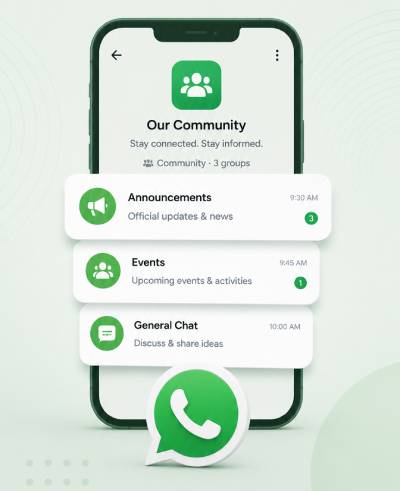
A WhatsApp Community is like a giant digital school building. It keeps lots of different, related chats safely organized under one big umbrella. WhatsApp created this feature because managing a bunch of separate groups was getting way too messy. It often leaves leaders stuck copy-pasting the same message everywhere while everyone else’s phones wouldn’t stop buzzing with random chat noise.
In a Community, a principal or club leader can send a quiet, important announcement to absolutely everyone at the same time. While members get to choose and join only the specific “classrooms” or sub-groups they actually care about. This gives Communities a huge advantage over regular groups. They stop annoying notification spam, let leaders manage thousands of people easily from one spot. Thus, keeping everyone’s phone numbers private and safe from strangers.
Why WhatsApp Introduced Communities ?
WhatsApp introduced Communities. It helps to fix the logistical headache of managing multiple, scattered chat groups for large organizations. Previously, leaders had to manually copy-paste the same announcements into dozens of different chats, while members suffered from notification fatigue as critical updates were quickly buried under casual chatter.
Communities solve this chaos by creating a central dashboard where administrators can send quiet, top-down announcements to the entire network at once, while members are free to join only the specific, smaller sub-groups that matter to them. This organized structure eliminates spam. It keeps important information highly visible, and vastly improves overall engagement.
How Does WhatsApp Community Work?
A WhatsApp Community works like a school building. It is where everything is neatly organized under one roof. At the front door is the main Announcement Group. It acts like the school’s PA system, only the principals (admins) can send messages through it to everyone at once, and students (members) can’t reply. It completely stops annoying chat spam. Off the main hallway, there are up to 50 Linked Groups that act like individual classrooms for focused topics, like a soccer team or an art club, where members can actually chat and hang out together.
Admins have total control to add or remove these rooms. While members get the freedom to browse the hallway and join only the specific classrooms they actually need. Thus, making it super easy to get important news without getting buried in endless notifications.
Who Can Use WhatsApp Communities?
WhatsApp Communities are perfect for any big group like schools, businesses, or neighborhoods. They need to share important news with thousands of people without creating a giant, chaotic mess. For instance, schools and coaching centers use them to let the principal blast out exam updates to everyone at once. Thus, keeping separate, quieter sub-groups for the soccer team or art club.
Businesses use them to send company-wide memos to all employees while letting the sales and marketing teams text privately in their own digital rooms. Finally, clubs, charities, and apartment complexes love them. It is because they can easily post announcements about volunteer projects or neighborhood meetings. This is all while keeping everyone’s personal phone numbers totally hidden & safe from strangers.
Key Features of WhatsApp Community :
1. Centralized Announcement Channel
Think of the Announcement Channel as the school’s PA system. When the principal (the admin) posts a message here, it instantly flies out to thousands of people across all the different clubs and classes at once. To stop your phone from blowing up with annoying spam, regular members aren’t allowed to text back, though they can still leave a quick emoji reaction to show they read it.
2. Multi-Group Nesting
Instead of having fifty random chats floating around your phone, this feature acts like a giant digital school building. It lets leaders pack up to 50 separate groups under one single roof. A leader can easily build brand-new chat rooms from scratch. Also it takes existing groups like the school soccer team or chess club and locks them into the main directory so they are super easy to find.
3. Advanced Admin Controls and Permissions
The main creator of a Community gets superpowers to keep everything running safely. They can hire up to 20 helper-admins to watch over the chats. It can instantly delete any mean or inappropriate messages that anyone sends, and completely kick out any sub-group that starts breaking the rules, all from one main control dashboard.
4. Improved Structural Organization
Instead of forcing you into one massive, messy chat where everyone talks over each other, a Community lets you browse a clean directory of groups like a menu. This means you get to pick and choose to join only the specific rooms you actually need. It is like your own grade’s chat—while skipping the ones you don’t care about. It completely saves your phone from useless clutter.
5. Streamlined Member Management
Inviting and managing thousands of people is made incredibly easy. It is through simple shareable links and barcode-like QR codes. If a troublemaker sneaks into the chats, an admin can kick them out of the main Community once. They will automatically vanish from every single smaller sub-group at the exact same time.
6. Secure and Encrypted Communication
Even though Communities can hold thousands of people, WhatsApp uses a special secret code system. It is called end-to-end encryption. It means absolutely no one on the outside, not even WhatsApp itself can read your private messages. Plus, to keep you safe from creeps, your phone number is completely hidden from the giant master list. Thus, strangers in other groups can’t see who you are.
7. Large-File and Rich Media Sharing
When you need to turn in massive school projects, share high-quality video clips, or pass around heavy presentation slides, Communities have you covered. It lets anyone inside the sub-groups send gigantic files up to 2 GB in size. It is big enough to share a full length, high definition movie without crashing the chat.
8. Integrated Event Distribution and Planning
Planning a club meeting or a weekend practice is super easy. It is because you can create official calendar events directly inside the chat window. Members can tap a button to say if they are coming or not, see who else is going, and get an automatic buzz on their phone right before the event starts so nobody forgets.
WhatsApp Communities vs Groups :
Choosing between a regular WhatsApp Group and a Community comes down to how many people you have and who needs to do the talking.
- A regular group is perfect for small, friendly teams—like a 5-person school project or a family dinner chat. It is where everyone wants to text equally and share funny memes.
- On the flip side, a Community makes way more sense for huge organizations that need a neat directory to run things smoothly without the noise.
- For example, a school can use a Community to let the principal blast out holiday notices to everyone at once, while keeping separate, quieter sub-groups for the soccer team or art club.
- Similarly, businesses use them to send company mémos to all staff while letting the sales team text privately. The franchises use them to send new menus to store managers, and neighborhood associations use them to post utility notices while letting residents join a fun local book club group—all while keeping everyone’s phone numbers safe and hidden from strangers.
How Businesses Can Use WhatsApp Community ?
Businesses can use WhatsApp Communities to bundle multiple chats under one roof. It allows them to instantly broadcast high-level announcements to thousands of employees, distributors, or customers at once without any chat spam. Underneath this main announcement channel, the company can link smaller, focused sub-groups for specific departments, regional teams, or customer niches to chat privately. This organized setup ensures important business updates never get lost. It eliminates notification noise & protects everyone’s privacy by hiding individual phone numbers from the global list.
How to Create a WhatsApp Community ?
Setting up a WhatsApp Community allows you to consolidate multiple chat streams into a single, organized directory. Follow this step-by-step procedure to build and configure your setup correctly.
The Setup Process
1.Open WhatsApp and Navigate to Communities: Requires smartphone or desktop app. Open WhatsApp on your device. On Android, tap the Communities icon, the three person silhouette at the top or bottom of your chat list. On iOS, it is located as a dedicated tab at the bottom of the screen.
2.Initiate the Community Builder: Under 1 min. Tap on “New Community” or the “+” icon. Read the brief introduction screen outlining the feature’s capabilities and tap “Get Started” to enter the creation wizard.
3.Define Name, Description, and Icon: Crucial for branding.
Enter a Community Name (up to 24 characters). Write a clear Description so potential members understand the purpose of the space. Tap the camera icon to upload a profile picture or logo that represents your organization.
4.Link Sub-Groups:
Connect up to 50 groups.
You must now structure your network. You can choose to:
Create New Group : Spin up fresh, empty topic chats from scratch. Add Existing Groups: Link standard groups where you are currently an admin. This pulls those existing members into the broader Community ecosystem automatically.
5.Finalize and Launch:
Generates the Announcement Channel.
Review your nested group layout. Tap the check icon or “Create” button. WhatsApp will automatically build your Community along with your default, read-only Announcement Channel.
6.Configure Admin Permissions:
Security step.
Navigate to Community Settings. Here, choose whether regular members can discover and request to join linked groups freely, or if group creation permissions should remain locked exclusively to administrators.
7.Distribute Invite Links:
Onboarding members.
Open your Community info page and select “Invite Members.” Copy the unique, secure invite link or generate a QR code to distribute via email, posters, or social media to begin onboarding your audience safely.
Administrative Note : When you link pre-existing groups to a new Community, members of those groups are not automatically added to all other linked groups. They are only bundled into the main global Announcement Channel. It preserves their choice to opt into other rooms manually.

WhatsApp Communities and Role of Botbuz Chatbot :
Combining a WhatsApp Community with a smart tool like the Botbuz Chatbot is like running a super-organized school. It is where the principal has a tireless robot helper. While the WhatsApp Community sets up the perfect building layout—giving everyone a clean directory of classrooms (sub-groups) to hang out in and a main PA system (the announcement channel) for big news—Botbuz acts as the 24/7 robot assistant standing at the front door.
The moment a new person walks in, the chatbot instantly greets them. It answers their basic questions & gathers their contact info. Also it hands them a ticket to join the specific community groups they’ll love. This clever combo lets businesses keep thousands of customers happy, organized, and perfectly looked after around the clock without the human staff ever getting overwhelmed by repetitive tasks.
Conclusion :
Ultimately, a WhatsApp Community provides the perfect structural blueprint. It helps to organize scattered chat groups and broadcast noise-free updates at scale. However, while a Community provides the physical framework, integrating the Botbuz Chatbot adds the automated muscle.
By pairing the two, businesses can use the Community layout to keep thousands of members neatly segmented. While Botbuz handles instant FAQ support, lead qualification, and CRM logging in the background 24/7. This combination creates a highly efficient communication ecosystem. It keeps audiences perfectly organized while driving automated business growth around the clock.